What happens when the trial ends?
- Your data stays as it is, and you can still sign in and pay.
- New orders stop until you choose a subscription and pay:
- If you chose a package: you pay its invoice in full.
- If you chose the wallet: you top it up.
- If you chose nothing: “The free trial is over and no plan was chosen” shows.
- Orders already under way finish as usual, and drivers can complete them.
- Your clients see in their app that “the delivery company is not taking new orders now”, so they call you.
Paying a package: invoices
- An invoice is issued on the first of each month, in advance for that month. It holds: the package price, then the extra drivers of the previous month, any extra features, and VAT.
- A yearly package: one invoice a year paid in advance, which renews by itself unless you change it. During the year, monthly invoices come only if your drivers go over the limit or you buy features.
- If you choose a package in the middle of a month (after the trial), the first month is charged for its days left.
- Each invoice has a number like
CF-numberand 7 days to pay from the day it is issued. - An invoice is open (not paid), overdue (its time passed) or paid.
How to pay an invoice
- Open “Subscription and payments” (or “Circle invoices”).
- In the “Payment” section you see the invoice due and the button “Pay … online”.
- You go to the page of the Fawaterak payment gateway, and pay by one of the ways it offers.
- You return to your console. If the payment’s confirmation has not arrived yet, press “Check again” after a little while.
If “Paying online is not available now” shows, contact Circle to pay another way.
Who can pay?
The owner and the accountant. You can print any invoice with the “Print” button.
Topping up the wallet
- Open “Subscription and payments” or “Circle wallet”.
- Type the amount in Egyptian pounds under “Top up the wallet online”.
- Press “Pay online” and finish paying on the gateway’s page.
- You return and find the balance increased, and the entry “Top-up” shows in “Latest entries”.
What you see on the wallet page:
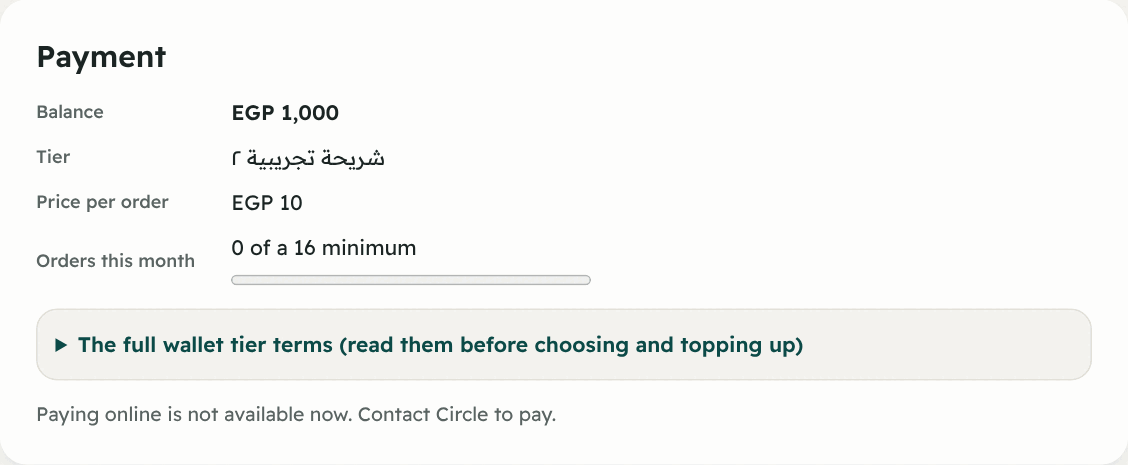
| Item | What it means |
|---|---|
| Balance | What is left for you |
| Price per order | Your tier’s price now |
| Tier | The tier you chose |
| Orders this month | Your orders against the minimum, like “30 of a 100 minimum” |
| Latest entries | Top-up, “Order …” (a charge), “Refund for cancelled order …”, an extra feature, “Minimum for …” |
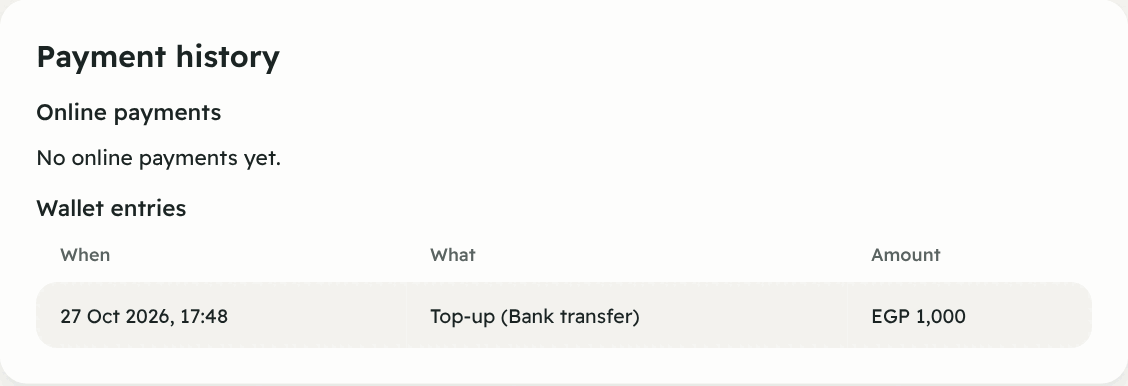
“Payment history”
At the bottom of “Subscription and payments” you find everything in one place: Online payments (not completed / paid / under review), Circle invoices, and Wallet entries. Use it for any accounting question.
In short: what can stop new orders?
| The message | The cause | The fix |
|---|---|---|
| The free trial is over and no plan was chosen | You chose neither a package nor the wallet | Choose from “Subscription and payments” |
| The free trial is over and the package invoice is unpaid | The first invoice is unpaid | Pay it from “Circle invoices” |
| The wallet balance does not cover the order | The balance is below the order’s price | Top up the wallet |
| Your company’s account is suspended by Circle | Circle suspended the account | Contact Circle (unit 14) |